Every spreadsheet pipeline starts beautifully, with colour-coded columns, a tidy "Status" dropdown and a "Next step" column you promise yourself you'll keep up to date.
Three weeks later half the rows say "follow up?", nobody's touched the "Last contact" column, and the real conversations are happening in LinkedIn DMs the spreadsheet knows nothing about.
So let's settle spreadsheet vs CRM properly, with a practical comparison, a clear tipping point and a simple pipeline you can set up this week in whichever tool you pick (I'll keep the sales pitch to the end). If you're asking the bigger question of whether you need a CRM at all, I've covered that in do solopreneurs need a CRM, and this post is the practical how-to that follows on from it.
TL;DR: A spreadsheet or Notion is fine for tracking leads while you have a handful of live conversations and follow up reliably. Switch to a CRM when follow-ups slip, conversations spread across channels, or you can't see your pipeline at a glance. Either way, use six clear stages with exit rules and review four numbers every Friday.
Should I use a spreadsheet or a CRM for leads?
Use a spreadsheet for leads if you have a small number of live conversations, one main channel and the discipline to update it daily. Use a CRM once you need follow-up reminders, conversation history across LinkedIn, email and WhatsApp, and a visual pipeline. The tool matters less than the stages and weekly review you run in it.
This is an honest side-by-side, and you'll see that neither option wins every row.
Spreadsheet or Notion | CRM | |
|---|---|---|
Setup | Minutes. You design every column yourself. | An afternoon, depending on the tool. Some come with sensible defaults, some need configuring. |
Cost | Usually free or already paid for. | Usually a subscription. Pricing varies a lot by tool. |
Follow-up reminders | Only if you build them and remember to check. | Built in. It tells you who to chase today. |
Conversation history | Copied in by hand, if at all. | Logged against the person. Some tools pull in LinkedIn, email and WhatsApp. |
Lead finding | Separate tool, then copy and paste. | Varies. Some include a lead database, many don't. |
Forecasting | Possible with formulas you maintain. | Pipeline value by stage, usually out of the box. |
Sharing | Easy to share a sheet, easy to break it too. | Permissions and views, which matters more for teams. |
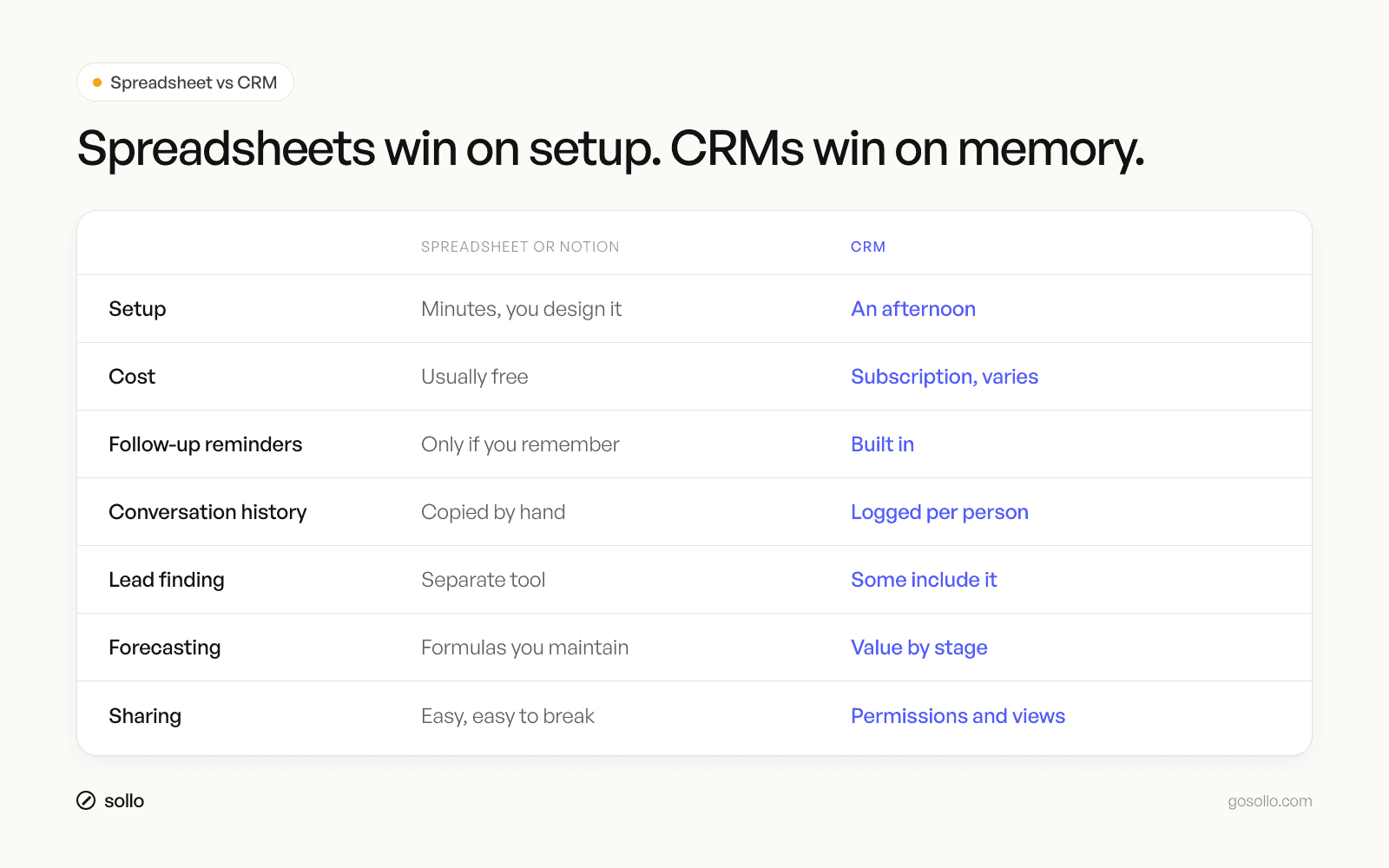
A spreadsheet comes out ahead on setup and cost, and it falls down on anything that depends on you remembering to do something, which, unfortunately, is most of what a pipeline is for.
Why is my pipeline visibility so bad right now?
Pipeline visibility is usually bad for three reasons: your stages aren't clearly defined, so deals sit in vague statuses; your conversations live outside your tracker, so it's always out of date; and you don't have a weekly review. Fix the stages and the routine first, then decide whether the tool is really the problem.
I see this all the time. Someone tells me their spreadsheet "doesn't work", and when we open it up, the Status column has eleven different values, including "maybe", "chasing" and "????".
Definitions that loose would follow you into any CRM, so before you switch anything, sort out the stages.
What pipeline stages should a consultant use?
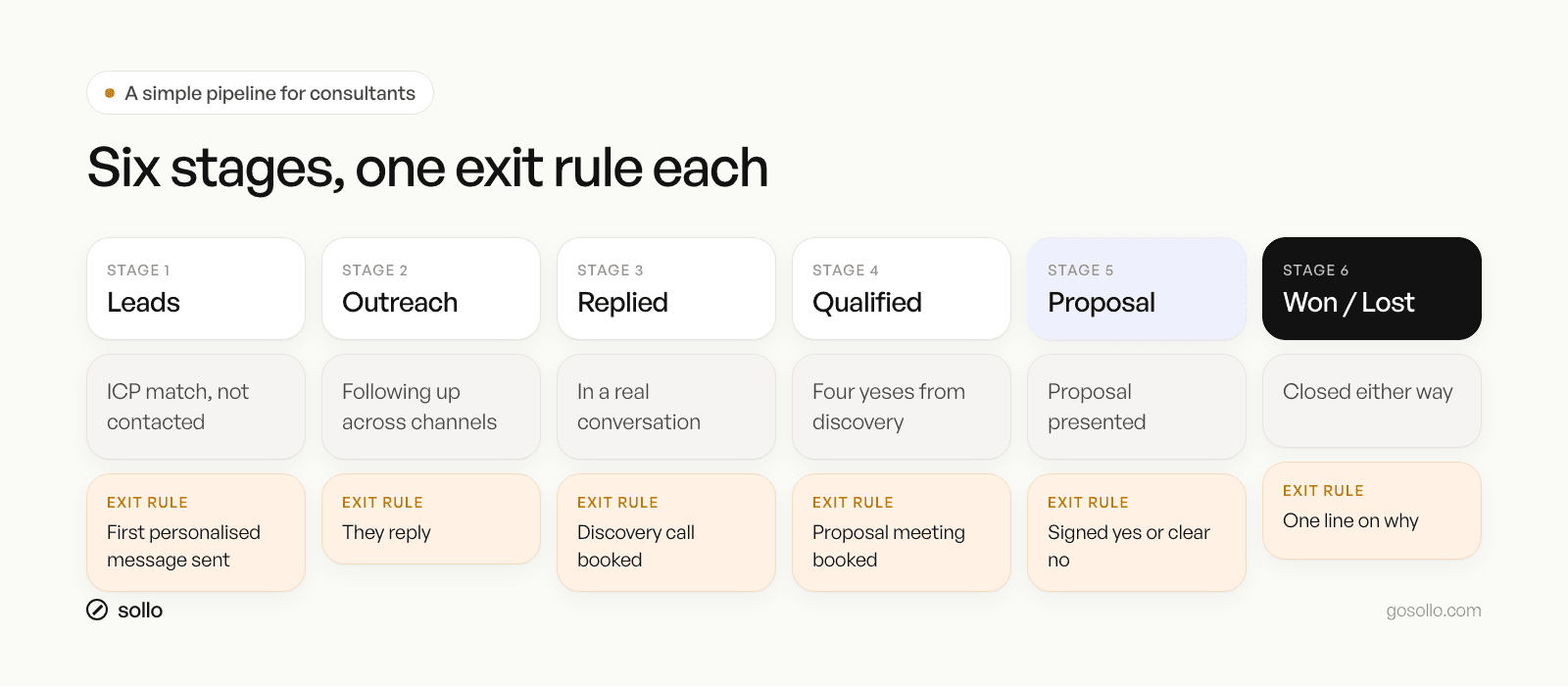
A solo consultant needs six pipeline stages: Leads, Outreach, Replied, Qualified, Proposal, and Won or Lost. Each stage should have one exit rule, a clear event that moves the deal forward. If you can't say what has to happen for a deal to move, the stage is too vague and your pipeline will lie to you.
This is the same shape we use in Sollo, and I'd keep it that simple, because every extra stage gives deals another place to hide.
Stage 1: Leads
People who match your ideal client profile, but you haven't contacted yet. Exit rule: you've sent a first message that's personalised and relevant to them.
Stage 2: Outreach
You've reached out and you're following up across channels. Don't panic if they don't reply first time, because the 7-11-4 rule of thumb says people need around 7 hours of interaction, 11 touchpoints and 4 different mediums before they buy. Exit rule: they reply.
Stage 3: Replied
You're now in a real two-way conversation. Exit rule: a discovery call is booked with a date in the diary. (Here's how to run that call.)
Stage 4: Qualified
You've had discovery and you can say yes to four questions: do they have a problem I can fix, do they agree they have it, do they want to fix it, and will they work with me to fix it? Exit rule: four yeses and a proposal meeting booked.
Stage 5: Proposal
You've presented the proposal and you're waiting on an answer. Exit rule: a signed yes or a clear no. "Let me think about it" keeps it here, with a follow-up date.
Stage 6: Won or Lost
The deal has closed, one way or the other. For lost deals, write one line on why, because after a few months those lines will tell you more than any dashboard.
Two rules make this work: every open deal has a next step with a date, and nothing moves a stage until its exit rule is met, however good the call felt.
When should I stop using spreadsheets for my sales pipeline?
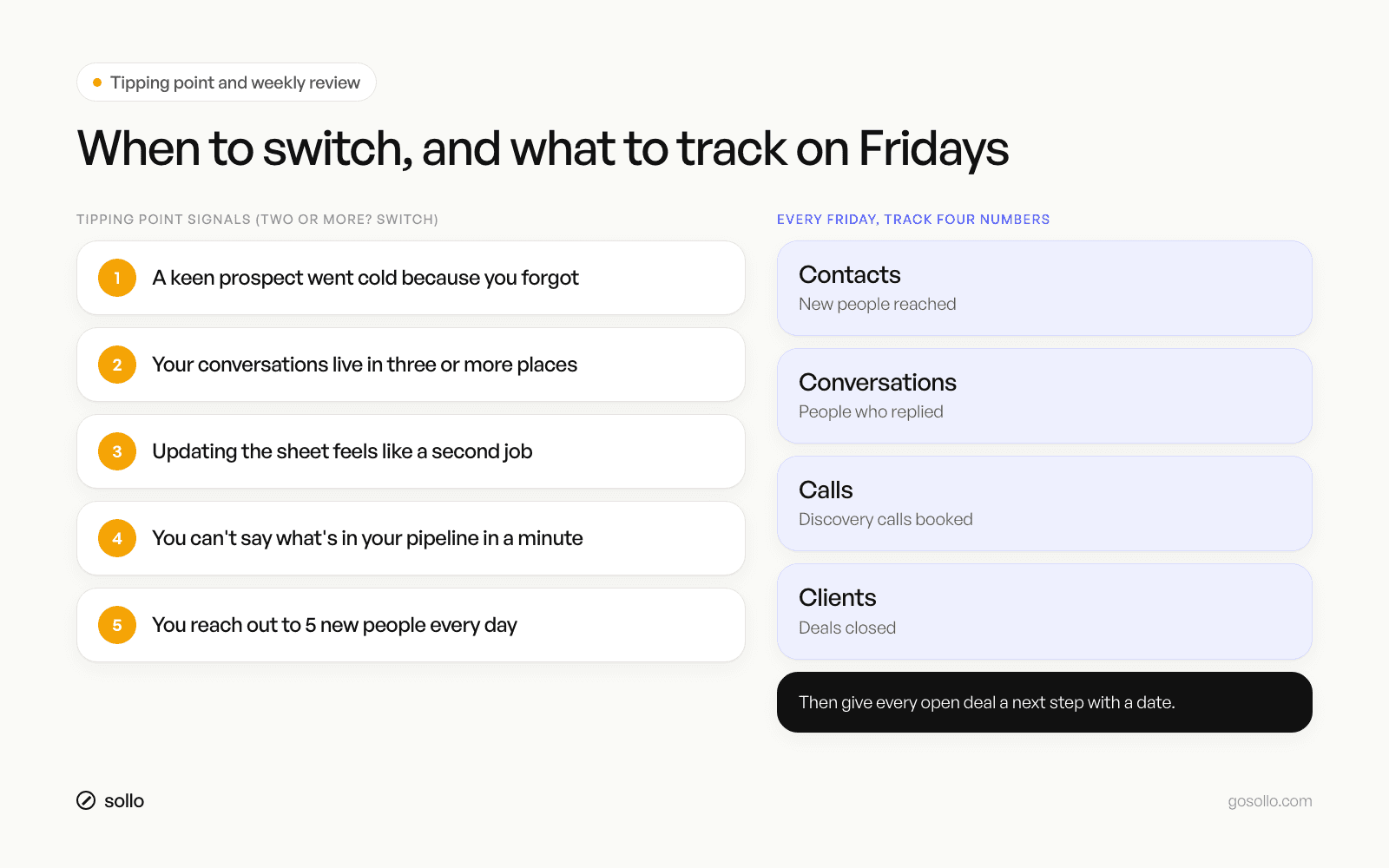
Stop using a spreadsheet for your sales pipeline when you hit the tipping point: you've missed a follow-up with a keen prospect, conversations are spread across three or more channels, updating the sheet takes longer than the outreach, or you can't tell your pipeline value in under a minute. Two or more of these means it's time.
These are the tipping point signals I'd watch for:
A keen prospect went cold because you forgot them. This is the one that costs you real money.
Your conversations live in three or more places. LinkedIn, email, WhatsApp, and the sheet knows about none of them.
Updating the sheet feels like a second job. So you stop doing it, and it goes stale.
You can't answer "what's in my pipeline?" quickly. If it takes more than a minute, you're flying blind.
You're doing daily outreach. Five new people a day is over 100 a month, which is a lot of rows to keep current by hand.
Priscila Silva Araujo, a solopreneur, described the moment well:
"I felt stuck between a messy Excel sheet and ultra-complicated CRM platforms. Sollo falls in the right middle. Robust yet simple."
That middle ground is what most solo consultants are after: something that needs less babysitting than a spreadsheet and carries far less weight than a system designed for a 50-person sales floor.
What are the best CRM alternatives to Notion for sales tracking?
If Notion is getting messy for sales tracking, the alternatives fall into two groups. Team CRMs like HubSpot, Pipedrive and Attio are capable and flexible, built around teams and pipelines with many reps. CRMs built for one person, like Sollo, focus on simple pipelines, follow-up reminders, a unified inbox and lead finding in one place.
Notion is brilliant for a lot of things, and I completely get why people start there, since you can build a database with a board view in ten minutes and it looks great.
The trouble is the same as with a spreadsheet. Notion has no idea when someone replied to you on LinkedIn and won't nudge you when a follow-up is due, so you end up doing the CRM's job by hand.
If you're choosing between the two groups, this is roughly how I'd decide:
Pick a team CRM if you're hiring salespeople soon, need deep customisation and reporting, or already live inside a marketing platform.
Pick a CRM built for one person if you're staying solo, you sell through LinkedIn, email and WhatsApp, and you want to be up and running in an afternoon.
How do you run a weekly pipeline review?
Run a weekly pipeline review every Friday in about 30 minutes. Track four numbers: contacts (new people reached), conversations (people who replied), calls (discovery calls booked) and clients (deals closed). Then move every deal to the right stage, give each one a dated next step, and close out anything that's gone cold.
This is the routine that fixes visibility, whatever tool you end up using.
Write down your four numbers. That's contacts, conversations, calls and clients.
Find the drop. Low replies means your message needs work, while plenty of calls and no clients means your call or proposal needs work.
Walk every open deal. Is it in the right stage by its exit rule? Does it have a next step with a date?
Close the zombies. Anything with no reply after your full follow-up sequence moves to Lost, and you can always reopen it later.
Book next week. Block out your daily outreach time and your follow-ups in the diary.
If you want a follow-up rhythm to plug into this, read how to follow up with prospects. The free Sollo Sales Vault also has the templates and worksheets for the whole sales system, including your Friday numbers.
How do you migrate from a spreadsheet to a CRM in an afternoon?
Migrate from a spreadsheet to a CRM in an afternoon by cleaning first and importing second. Delete dead rows, map your messy statuses to six clear stages, give every open deal a next step and date, then import the CSV. Connect your inboxes, check ten records by hand, and archive the old sheet so you can't drift back.
Step 1: Clean before you move (45 minutes)
Sort by last contact and archive anyone you haven't spoken to in six months and have no reason to chase, because importing your mess just gives you the same mess in a nicer tool.
Step 2: Map your statuses to six stages (15 minutes)
Take every value in your Status column and map it to Leads, Outreach, Replied, Qualified, Proposal, or Won or Lost. "Maybe", "chasing" and "????" all need a real home.
Step 3: Add a next step and date to every open deal (30 minutes)
If you can't think of a next step for a deal, that usually means it belongs in Lost.
Step 4: Import and connect (45 minutes)
Export to CSV, import, and match your columns to the CRM's fields. Connect your email and, if the tool supports it, LinkedIn and WhatsApp so new conversations land in the right place automatically.
Step 5: Spot-check and retire the sheet (15 minutes)
Open ten records and check they look right, then archive the spreadsheet, since keeping both open is how you end up with neither of them up to date.
FAQ
Is a spreadsheet good enough as a CRM?
A spreadsheet is good enough while you have a handful of live conversations, one main channel and the habit of updating it daily. It stops being good enough when follow-ups slip or conversations spread across LinkedIn, email and WhatsApp, because a spreadsheet can't remind you or pull in message history.
What's the difference between a spreadsheet and a CRM?
A spreadsheet stores whatever you type into it. A CRM is built around people and deals, so it logs conversations against each contact, reminds you when to follow up, shows your pipeline visually by stage and, in some tools, helps you find new leads. With a spreadsheet, all the remembering is down to you.
How do I set up a visual sales pipeline?
Create six stages as columns: Leads, Outreach, Replied, Qualified, Proposal, and Won or Lost. Write one exit rule for each, the event that moves a deal forward. Add every open deal as a card with a next step and date. Most CRMs and Notion boards support this kanban view.
Can I use Notion as a CRM?
Yes, and plenty of solopreneurs start there, because a Notion database with a board view makes a decent visual pipeline. The limits are the same as a spreadsheet: no automatic follow-up reminders, no conversation history from your inboxes, and no built-in lead finding. It works well enough until your volume grows.
How many pipeline stages should a solo consultant have?
Around six, which is enough to see where each deal is and few enough that you can define a clear exit rule for every stage. More stages usually means vaguer definitions and more places for deals to sit without a next step, so start with six and only add one if you find a real gap.
How can Sollo help?
Sollo gives you a visual pipeline out of the box, with deals, stages and follow-up reminders, so every lead has a next step and nothing keen goes cold. LinkedIn, email and WhatsApp sit in one inbox, attached to the right person, so your pipeline stays current without copy and paste.
It also finds leads that match your ideal client from a 380-million-person database, so your Leads column fills from the same place you work it. Move your live deals across, map them to your stages, and run your Friday review from one screen.